锐捷交换机密码恢复记录
文章目录8 节
这篇文章记录锐捷交换机在遗忘管理密码后的恢复过程。本质上是通过 BootLoader 模式绕过现有配置,再恢复配置文件并重新设置密码。操作前建议先确认设备归属和维护窗口,避免误操作影响现网。
处理步骤
1. 重启设备并进入 BootLoader
先手动给设备断电重启。出现 Ctrl+C 提示时,同时按下 Ctrl + C 进入 BootLoader 菜单。
====== BootLoader Menu("Ctrl+Z" to upper level) ======
TOP menu items.
************************************************
0. Tftp utilities.
1. XModem utilities.
2. Run main.
3. SetMac utilities.
4. Scattered utilities.
5. Set Module Serial
************************************************
Press a key to run the command:
2. 进入命令行界面
按 Ctrl + Q,输入 ubootui,回车后马上按一次 Ctrl + P。
s29xs#ubootui
Leaving simple UI....
s29xs#
3. 调整启动级别并引导系统
执行下面的命令进入维护启动流程:
s29xs#setenv runlevel 2
s29xs#run linux
Creating 1 MTD partitions on "nand0":
0x000001000000-0x000002e00000 : "mtd=6"
UBI: attaching mtd1 to ubi0
UBI: physical eraseblock size:   131072 bytes (128 KiB)
UBI: logical eraseblock size:    126976 bytes
UBI: smallest flash I/O unit:    2048
UBI: VID header offset:          2048 (aligned 2048)
UBI: data offset:               4096
UBI: attached mtd1 to ubi0
UBI: MTD device name:           "mtd=6"
UBI: MTD device size:           30 MiB
UBI: number of good PEBs:        240
UBI: number of bad PEBs:        0
UBI: max. allowed volumes:       128
UBI: wear-leveling threshold:    4096
UBI: number of internal volumes: 1
UBI: number of user volumes:     1
UBI: available PEBs:            19
UBI: total number of reserved PEBs: 221
UBI: number of PEBs reserved for bad PEB handling: 2
UBI: max/mean erase counter: 2/0
UBIFS: recovery needed
UBIFS: recovery deferred
UBIFS: mounted UBI device 0, volume 0, name "kernel"
UBIFS: mounted read-only
UBIFS: file system size:   26030080 bytes (25420 KiB, 24 MiB, 205 LEBs)
UBIFS: journal size:       3682304 bytes (3596 KiB, 3 MiB, 29 LEBs)
UBIFS: media format:       w4/r0 (latest is w4/r0)
UBIFS: default compressor: LZO
UBIFS: reserved for root:  0 bytes (0 KiB)
Unmounting UBIFS volume kernel!
Uncompressing Kernel Image ... OK
Loading Device Tree to 823fc000, end 823ff593 ... OK
Starting kernel ...
4. 备份当前配置文件并重启
系统启动到维护环境后,执行下面的命令。这里的作用是先把原有配置文件改名,避免设备继续加载旧密码。
~ #
~ # cd /data/
/data # ls
/data # mv config.text config.bak
/data # sync
/data # reboot
5. 启动后恢复配置文件
设备重启完成后,进入特权模式,把刚才备份出来的配置文件恢复回来:
Ruijie>enable        ----->进入特权模式
Ruijie#copy config.bak config.text
Ruijie#copy flash:config.bak flash:config.text

# 然后用以下命令使配置生效:
Ruijie#copy startup-config running-config
6. 重新设置密码
恢复配置后,再根据当前设备策略修改管理密码即可。
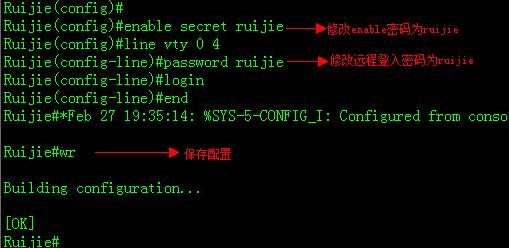
结果说明
完成以上步骤后,重新登录交换机即可使用新密码进入管理界面。整个过程的核心点在于:
- 通过 BootLoader 进入维护模式。
- 临时绕过原配置文件中的旧密码。
- 恢复原有配置后再重新设置密码。
如果环境里已经启用了集中认证或额外安全策略,恢复完成后还需要同步检查 AAA、Telnet/SSH 和本地账户配置,避免后续再次被旧策略覆盖。